0 €
- Availability:
- In Stock
- Product Code:
- Nissan OBD-Prog

* Check out below special discounts for bulk orders and dealers!
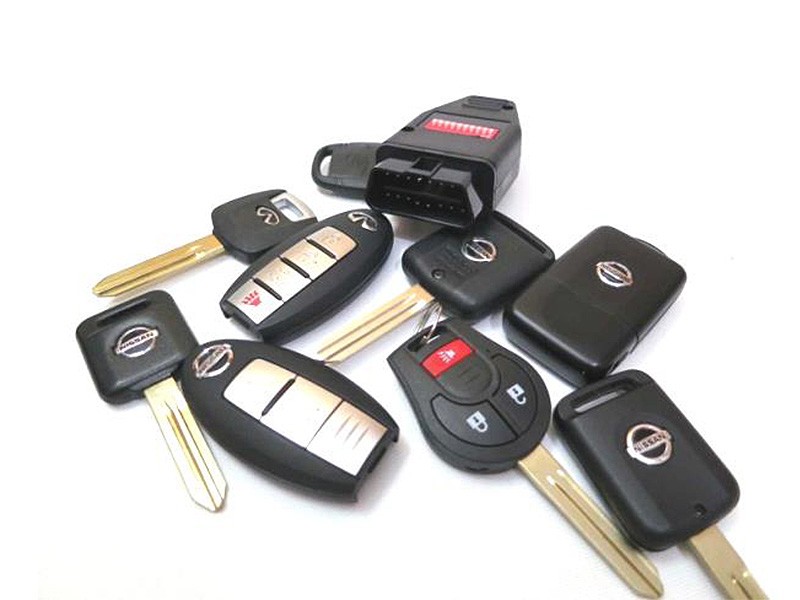
“Nissan OBD-Prog” - is a standalone device for electronic key registration on Nissan and Infiniti passenger vehicles. The device supports immobilizer systems with regular key, “Intelligent key” (engine start without key – by ignition switch), and “Smart key” (engine start by button). The device DO NOT support car models produced on Renault factories: Micra, Note, Tiida.
Operation sequence (step-by-step instruction)
1. Make sure the vehicle's battery is fully charged.
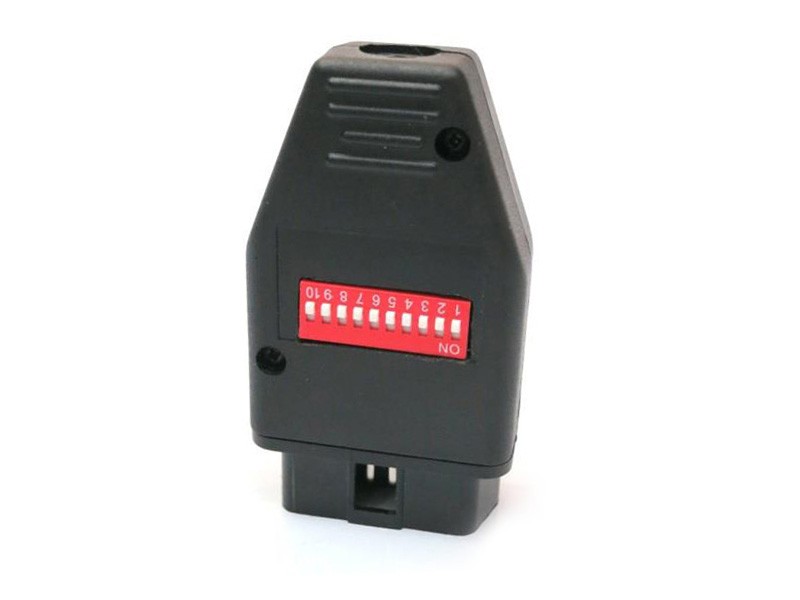
2. Prepare “Nissan OBD-Prog” by setting switches in accordance with the immobilizer system type and kind of engine (petrol or diesel).
3. Regular key system
3.1. Switch position for petrol engine cars: 1 – ON, others – OFF, for diesel engine cars: 6—ON, others – OFF.
3.2. Insert new key into ignition lock and turn on ignition.
3.3. Plug the programming device into diagnostic connector of the vehicle.
3.4. Within five seconds the device will beep three times and LED on it will light up with green.
3.5. Turn ignition off and on twice consecutive (do not remove the key from ignition lock). Immobilizer indicator on dash-panel will blink five times and then goes off.
3.6. Turn off ignition. The key is registered in system now.
3.7. If you want to register another key, remove the newly registered key and insert the new one within five seconds of turning off ignition and repeat steps 3.4-3.6.
4. “Intelligent Key” system
4.1. Switch position for petrol engine cars: 2 – ON, others – OFF, for diesel cars: 7—ON, others – OFF.
4.2. Insert new key into electronic ignition lock and push on it.
4.3. Plug the programming device into diagnostic connector of the vehicle.
4.4. Within two seconds steering column will be unblocked and the device will beep once.
4.5. Turn ignition on. Within five seconds the device will beep three times and LED on it will light up with green.
4.6. Turn ignition off and on twice consecutive (do not remove the key from electronic ignition lock). Immobilizer indicator on dash-panel will blink five times and then goes off.
4.7. Turn off ignition. The key is registered in system now, but engine could be started by hardware ignition lock only (you have to insert the key into ignition lock to start the engine).
To start the engine without key (by ignition switch) and to use “lock” and “unlock” buttons on the key you should activate “Intelligent key” system.
4.8. If you want to register another key, remove the newly registered key and insert the new one within five seconds of turning off ignition and repeat steps 4.2-4.7.
5. “Intelligent Key” non-contact mode activation
5.1. Set switches for proximity key deleting mode: 4 – ON, others – OFF.
5.2. Turn on ignition with newly registered key.
5.3. Plug the programming device into diagnostic connector of the vehicle. The device will beep three times and LED on it will light up with green. It means all registered proximity keys are deleted from system.
5.4. Turn off ignition and unplug the device.
5.5. Set switches for proximity key registration mode: 3 – ON, others – OFF.
5.6. Turn on ignition with newly registered key.
5.7. Plug the programming device into diagnostic connector of the vehicle and wait for one beep.
5.8. Push once any button on the proximity key. The device will beep three times – it means the registration procedure completed successfully and non-contact mode is activated now.
5.9. If you want to register another proximity key, repeat steps 5.6-5.8 with next key within five seconds of sound signal (beep).
6. “Smart Key” system
6.1. Switch position: 5 – ON, others – OFF.
6.2. Insert new key into slot. Depress brake pedal OR “Start” button once.
6.3. Plug the programming device into diagnostic connector of the vehicle.
6.4. Within five seconds steering column will be unblocked and the device will beep once.
6.5. Press “Start” button to turn ignition on. The device will beep once and then three more times, LED on it will light up with green.
6.6. Turn ignition off and on twice consecutive (do not remove key from the slot). Immobilizer indicator on dash-panel will blink five times and then goes off.
6.7. Turn off ignition. Steering column will be blocked.
6.8. If you want to register another smart key, remove the newly registered key from the slot and insert the new one within five seconds of turning off ignition and repeat steps 6.5-6.7.
7. “Smart Key 2” system (key slot is absent)
7.1. Switch position: 5 – ON, others – OFF.
7.2. Open driver’s door or depress brake pedal.
7.3. Plug the programming device into diagnostic connector of the vehicle.
7.4. Within five seconds steering column will be unblocked and the device will beep once. If the steering column is already unblocked wait for sound signal (beep).
7.5. Within five seconds of sound signal bring new smart key to “Start” button and press on it. Ignition will turn on and the device will beep three times.
7.6. Unplug the programming device and turn off ignition by pressing “Start” button one more time.
7.7. Turn on ignition (bring the smart key to “Start” button and press on it).
7.8. Turn off ignition and press “unlock” button on smart key.
7.9. Repeat steps 7.7-7.8 for each smart key that you want to register.
7.10. To complete registration procedure bring last smart key to “Start” button, turn ignition on and off.
Recommendations
You should use original key blanks or analogues for successful registration: regular key systems – PCF7936 transponders, keys with buttons – PCF7946 emulators.
Pay attention for frequency matching on key and vehicle (European and American cars use different frequencies).
The programming device has self-diagnostics mode.
To activate this mode set all switches into ON position and give power according to OBD-II pinout (4, 5 – GND, 16 – +12V).
If everything is OK, LED on the device will blink green and red alternately.
If something is wrong the device will beep six times consecutive.
Instruction Manual:

- Download file (More Info)
| Quantity / Price | |
|---|---|
| 1 pcs | |
| 3 pcs | |
| 5 pcs | |
| 10 pcs or more | Special conditions, contact us to discuss. |